
Budgeting Made Visual, Simple & Clutter-Free
HoolaMoola helps you stay on top of spending with a calendar-first approach and weekly breakdowns.
Free while HoolaMoola is in beta — no card required.
Sign up with Google in seconds — no password to create.
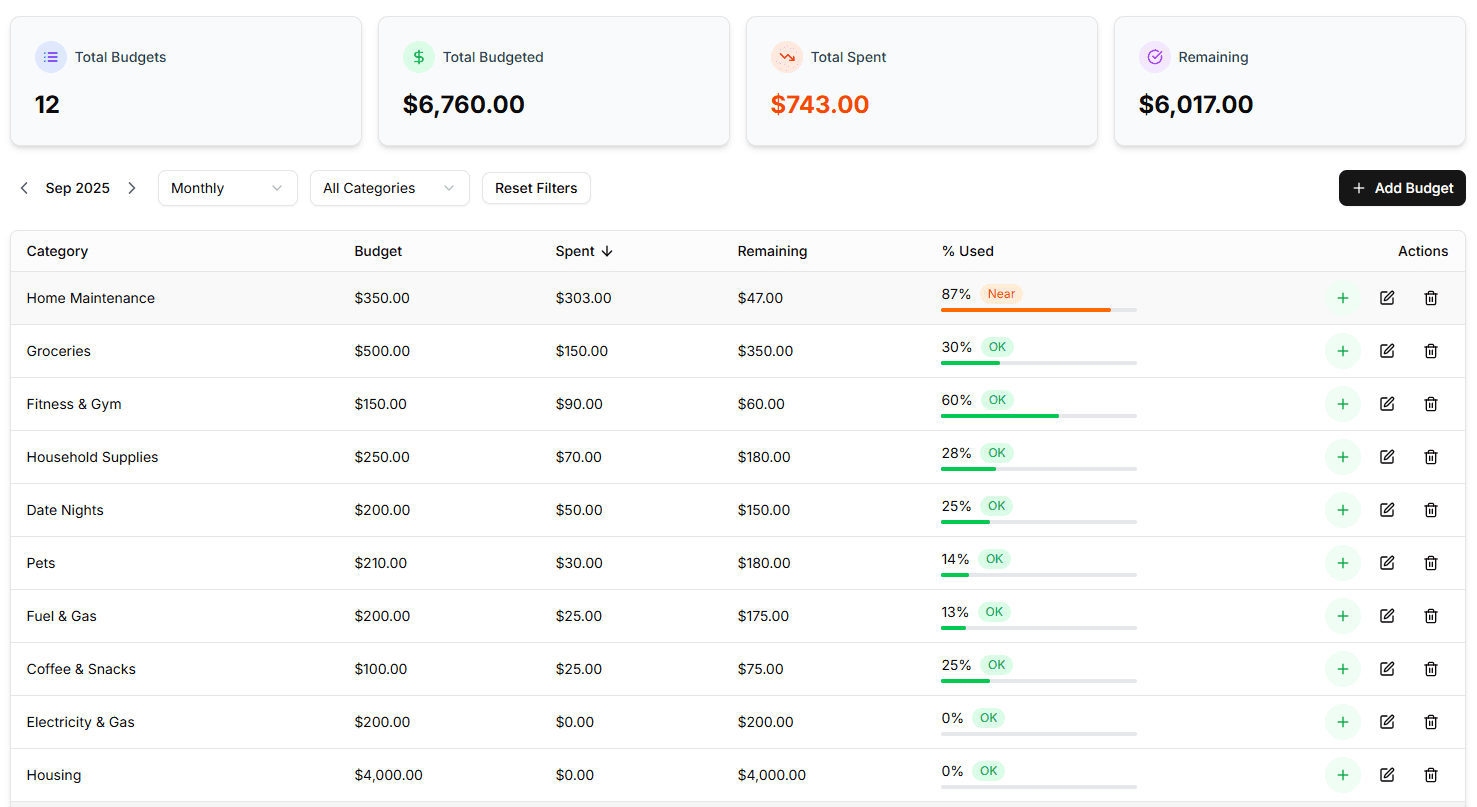
See every dollar before it’s spent
Track what comes in, what’s already committed, and what’s left to spend — all in one clean, calendar-first view.
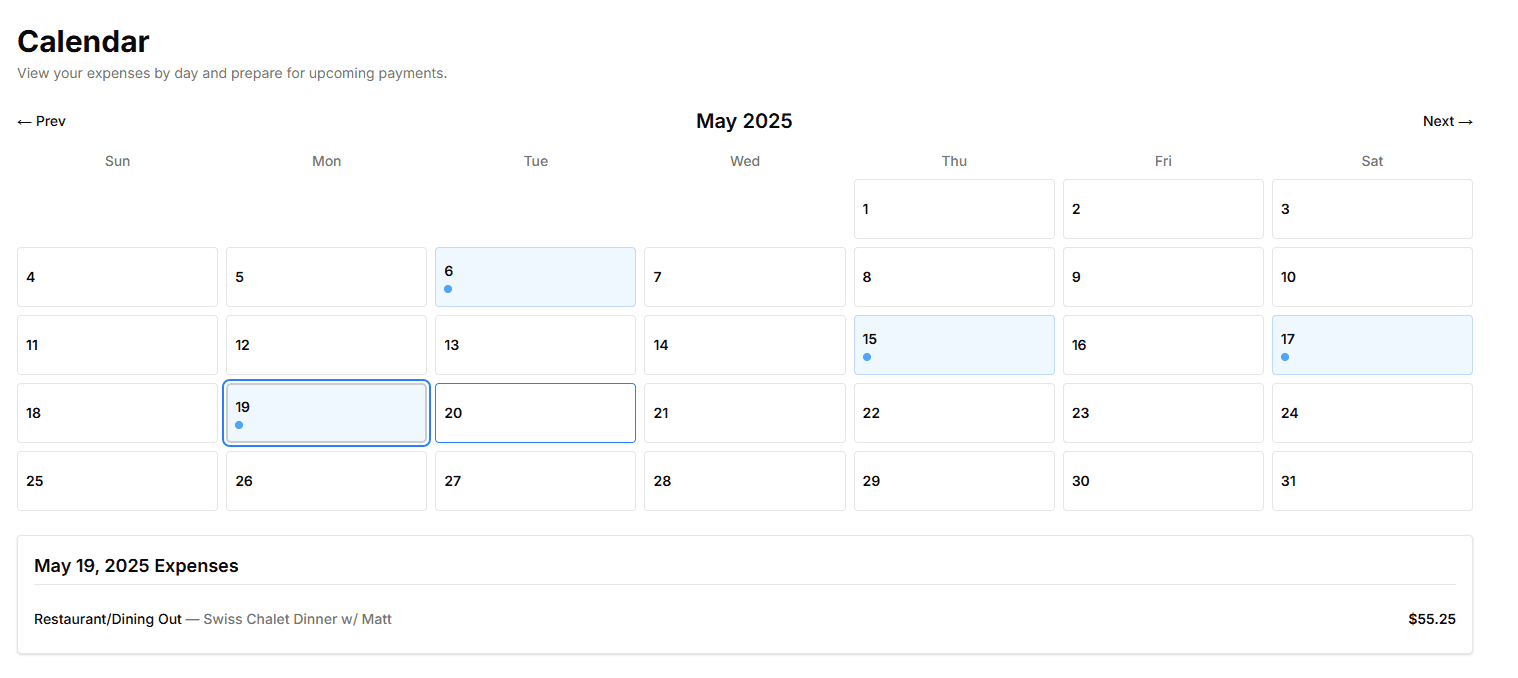
See it coming on the calendar
Rent on the 1st, your car payment on the 12th, a dinner out on the 19th — every expense laid out on a calendar before it lands. Tap any day to see what happened, or what's still coming, so a “surprise” bill stops being a surprise.
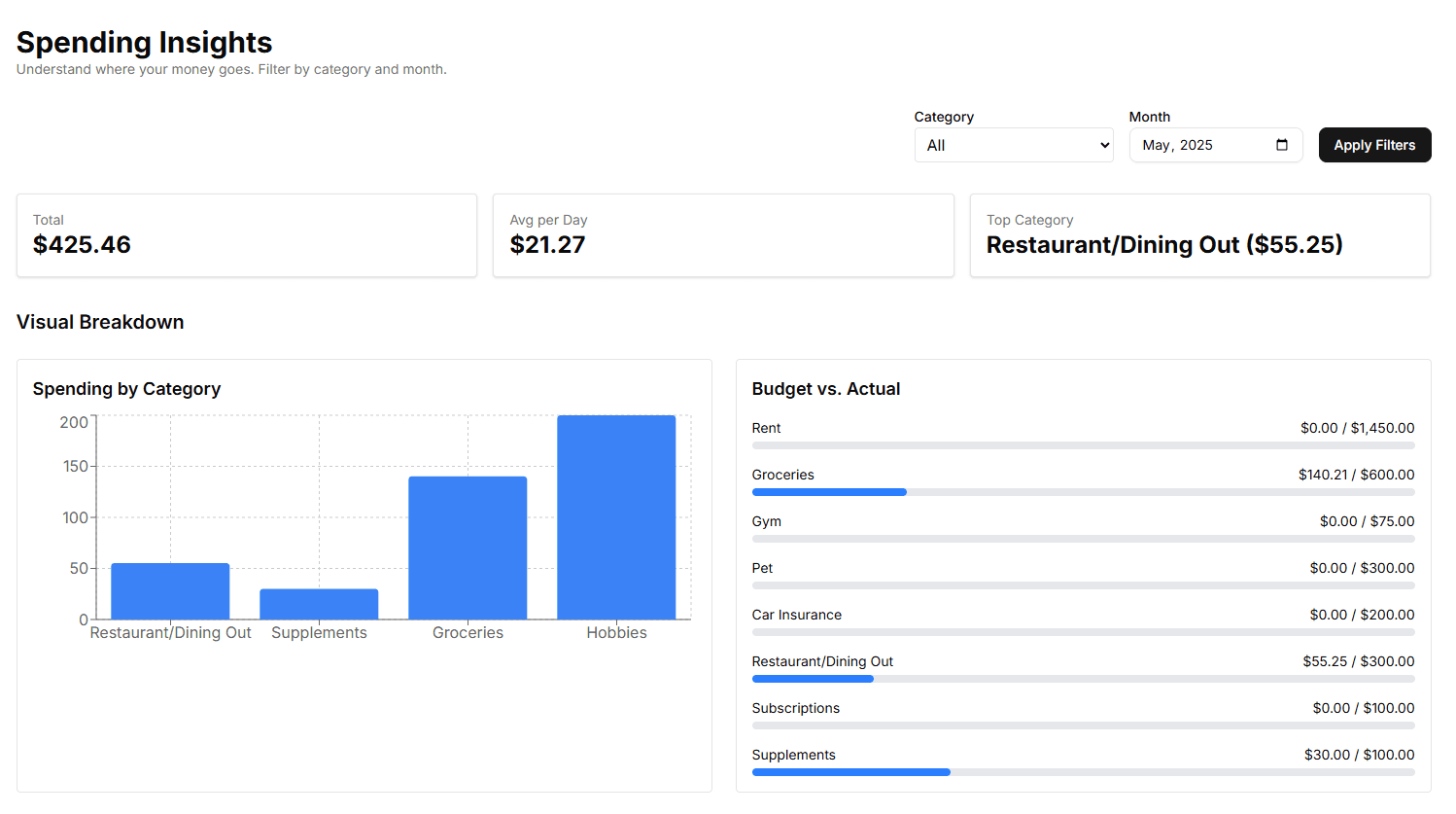
Know where the money went
Filter by month or category to get your total, your daily average, and your biggest category at a glance — plus a budget-vs-actual bar for every category, so nothing quietly creeps past its limit.
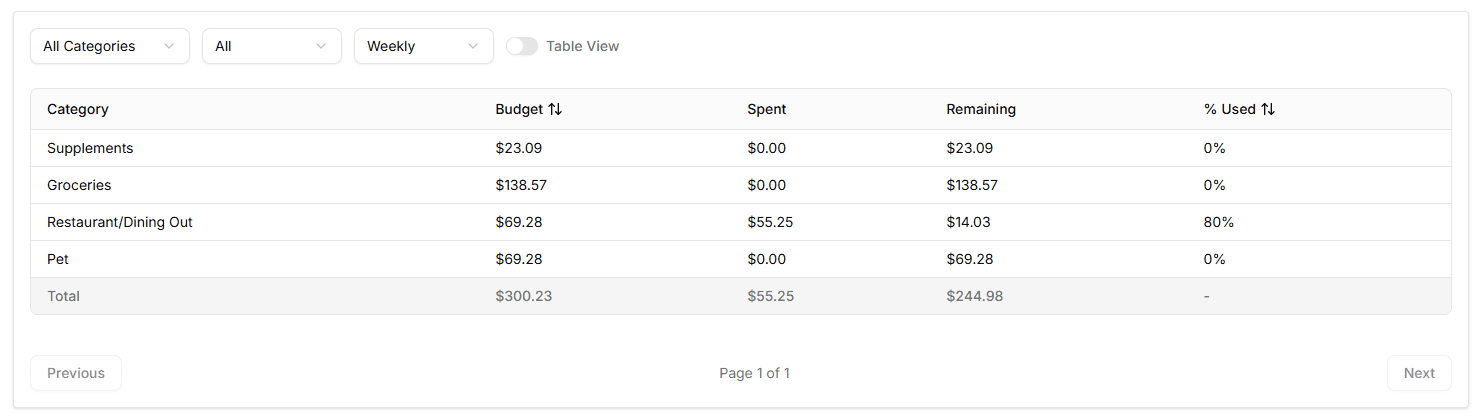
Budget a week at a time
A month is a long time to plan around — $600 for groceries feels fine on the 3rd and impossible on the 27th. HoolaMoola splits each budget into weekly amounts and shows what's left per category, this week. Paid fortnightly? Switch to biweekly to match.
Also included
Income tracking
See money in, not just money out — recurring sources included.
Bills & subscriptions
Add recurring bills once; they post automatically when due.
Weekly, biweekly or rollover
Match your pay cycle, and carry leftovers forward if you like.
Categories & groups
Organize spending the way you already think about it.
10 currencies
Display in USD, EUR, GBP, JPY and more.
Private by design
No bank connection, so there's nothing to leak.
How it works
Three steps, in this order. Each one makes the next easier.
- 1
Add what comes in
Your pay, and anything else that arrives on a schedule. Enter it once — HoolaMoola works out your monthly total and keeps it right when you get a raise.
- 2
Add what's already spoken for
Rent, utilities, insurance, Netflix. Add each bill once and it posts to your expenses automatically every time it's due — you never enter it again.
- 3
Decide on what's left
What remains after the bills is money you actually choose how to spend. Set weekly limits for groceries, eating out and the rest, and watch them as the week goes.
No bank logins. Ever.
HoolaMoola never asks for your banking credentials and never connects to your accounts. There’s no third-party aggregator sitting between you and your bank, and no transaction history for anyone to leak.
You add expenses yourself, in a couple of taps. That’s a deliberate trade: it costs you a few seconds a day, and in exchange nothing about your finances leaves your control. Entering a purchase is also the moment you notice it — which is usually the point.
- No credentials to hand over
- No account access to breach
- You see every expense you enter
Why I Built HoolaMoola
I’ve always wanted to stick to a budget — but every app I tried made things harder, not easier. They were packed with features I didn’t need, confusing reports, and cluttered dashboards that felt more overwhelming than helpful.
What I really needed was a simple way to see how much I had left to spend for the week, not the month. Something visual, clean, and built around the way I actually live — with bills, food, and life happening throughout the week.
So I built HoolaMoola: a budgeting app that’s simple from the start. You can see your spending laid out on a calendar, break your monthly budget into manageable weekly goals, and get clarity without the clutter.
“This was the first budgeting app that actually clicked for me. The calendar makes it so easy to plan my expenses.”
“I thought the platform was well laid out as I got hang of navigating it fairly quickly. I love how simple but well designed it is.”
Common questions
Do I have to add expenses manually?
Day-to-day spending, yes — HoolaMoola doesn’t connect to your bank, so you enter it yourself, usually a couple of taps. Recurring bills are the exception: add rent, utilities or a subscription once and it posts automatically every time it’s due. That’s the trade that keeps your banking credentials out of it entirely.
Does HoolaMoola connect to my bank?
No. There’s no bank linking, no third-party aggregator, and no access to your accounts. We never ask for your banking credentials.
How much does it cost?
Nothing while HoolaMoola is in beta. You get everything straight away — income and expense tracking, auto-posting bills, weekly and biweekly budgets, the calendar, and spending insights — with no card required.
Can I use HoolaMoola outside the US?
Yes. You can display everything in any of 10 currencies — US dollar, euro, British pound, Japanese yen and more — from Settings.
Ready to Take Control of Your Budget?
Start your journey toward financial clarity with HoolaMoola.
Free while HoolaMoola is in beta — no card required.
Sign up with Google in seconds — no password to create.
Something missing? Leave feedback